

Google Toolbar en image :

Attention, Google Toolbar n'est plus disponible…
Toolbar
La barre Google était une extension (plugin) à ajouter à un navigateur (Internet Explorer ou Firefox) et qui permettait de faire plein de choses plus rapidement. Depuis la sortie de Chrome, elle n'a plus été maintenue, puis supprimée.
Etant donné qu'elle a été très populaire à une époque, cet article décrit malgré tout ce qu'on pouvait faire avec, à cette époque.
Présentation générale (v1 pour Internet Explorer)
La Google Toolbar (ou barre d'outils de Google en français...) est un petit outil qui se révèle extrêmement pratique aux internautes comme aux webmasters s'intéressant à Google. Cette rubrique vous explique ce que c'est que cette Google Toolbar, comment l'installer et l'utiliser. Vous saurez aussi quelles informations détaillées sont transmises entre les serveurs de Google et la Google Toolbar sur votre navigateur...
Pour permettre à l'internaute d'effectuer des recherches sur le web encore plus facilement et rapidement, mais bien sûr également pour augmenter le nombre de ses utilisateurs, Google a développé un petit programme dénommé Google Toolbar, qui ajoute une barre d'outils à Internet Explorer. On peut saisir une recherche directement dedans et obtenir les résultats dans une page du navigateur comme si on était allé sur la page d'accueil de Google pour taper la recherche.
Outre un accès rapide à la recherche, cette barre indique également des informations sur la page en cours, à savoir son PageRank et la catégorie concernée du répertoire de Google.
Le PageRank indiqué est schématisé par une barre verte horizontale, plus ou moins large. En pointant la souris au-dessus, on obtient un nombre entre 0 et 10. Ce nombre n'est qu'une approximation grossière de la valeur réelle du PageRank, qui est un nombre bien plus précis (soit un grand nombre entier, soit un nombre avec des décimales).
On suppose que cette échelle de 0 à 10 est logarithmique : par exemple, il est bien plus difficile de faire passer le PageRank d'une page de 5 à 6 que de 4 à 5.
Attention à noter les deux points particuliers suivants :
aucune barre verte n'apparaît : le PageRank vaut zéro.
Il s'agit en général d'une page encore inconnue de Google, et plus précisément d'une page d'un site encore inconnu. Dans certains cas, pendant la Google Dance, la barre Google peut afficher temporairement un PageRank nul pour une page pourtant connue. Il peut aussi s'agir d'une page qui a été bannie par Google, pour non-respect de ses règles.
Une barre apparaît, pourtant la page est introuvable dans Google.
Dans ce cas il s'agit d'une page encore inconnue de Google mais dont le répertoire père est connu. La valeur indiquée n'est alors qu'une estimation égale en général à 1 de moins que le PageRank du répertoire père. A la prochaine mise à jour des PageRank (Google Dance), le véritable PageRank devrait être affiché.
A côté du PageRank est indiquée la catégorie du répertoire de Google dans laquelle est référencé le site (ou parfois la page, si elle est dans une autre catégorie que le site lui-même). Ce répertoire correspond à une utilisation adaptée par Google de l'annuaire DMOZ. Un clic sur l'icône permet d'aller directement dans cette catégorie et de consulter d'autres sites traitant du même sujet, classés par PageRank.
Les outils de la Toolbar Google
Les derniers outils proposés par la barre Google permettent d'obtenir d'un clic l'une des informations suivantes :
- la page cachée par Google lors de sa dernière indexation
- les pages similaires à la page en cours (commande related: de Google)
- les pages liées (ou backward links) de l'URL en cours (commande link: de Google)
- la traduction automatique de la page
Comment trouver son checksum Google avec la barre d'outils ?
Qu'est-ce que le checksum Google ?
A chaque fois que vous affichez une page dans Internet Explorer avec la Google Toolbar, un dialogue s'établit entre un serveur de Google et la barre (au travers d'une DLL). Afin de se protéger, Google a inclus dans ce dialogue un paramètre codé sous forme de chiffres, que l'on appelle le checksum. Sans ce checksum, vous ne pouvez pas simuler le dialogue établi entre la Toolbar et le serveur de Google. Un checksum unique est attribué à chaque URL (a priori il ne change pas dans le temps, mais ceci n'est pas vérifié à 100%).
A quoi ça sert de le déterminer ?
En règle générale, ça ne sert à rien... Sauf pendant la Google Dance, période pendant laquelle sont mises à jour par Google certaines informations sur une page : son PageRank, son nombre de backlinks et parfois sa catégorie dans l'annuaire de Google (basé sur l'annuaire DMOZ). Pour déterminer pour une page donnée avec quelques jours d'avance ces informations, il faut connaître son checksum.
Comment trouver son checksum ?
Comme nous l'avons dit plus haut, la Toolbar "dialogue" avec un serveur de Google. Celui-là laisse une trace sur votre ordinateur sous la forme d'un fichier temporaire Internet. La marche à suivre est donc la suivante :
Si ce n'est déjà fait, installez la Google Toolbar avec ces fonctionnalité avancées (le PageRank).
Videz le cache de votre navigateur Internet Explorer.
Tapez l'URL précise de la page que vous souhaitez analyser.
Regardez sur votre disque dur dans le répertoire des fichiers temporaires d'Internet Explorer (sous XP c'est sur c:Documents and Settingsvotre_loginLocal SettingsTemporary Internet Files) et cherchez un fichier HTML dont le nom commence par search? (le nom est indiqué dans la colonne "Nom")
Double-cliquez et répondez Oui à la question de la boîte de dialogue qui surgit.
Vous vous trouvez alors sur une page web dont l'URL est complexe et très longue, et qui contient la valeur de ce fameux checksum : c'est le nombre situé entre le ch= et le &
La page contient une série d'informations
Google Toolbar v2 pour Internet Explorer
Voici les nouveautés de la v2 sortie en juin 2003...
Blocage de pop-up (Pop-up Blocker) :
La barre d'outils possède une nouvelle fonctionnalité qui permet de bloquer les ouvertures de pop-up, celles-ci étant souvent des publicités. Pour ne pas pénaliser les sites affichant des pop-up avec une information importante, il est possible d'indiquer pour chaque site si les pop-up ne doivent pas être bloqués (la barre d'outils gère une liste blanche des sites autorisés à afficher des pop-up, par opposition à une liste noire).
Choix de la version internationale de Google :
Il est possible de choisir quel site de Google va être utilisé pour lancer les recherches. Ainsi vous pouvez choisir google.fr plutôt que google.com. Vous avez le choix entre 75 pays (liste complète des versions internationales de Google).
Remplissage automatique (AutoFill) :
Evite d'avoir à taper régulièrement les mêmes informations dans les formulaires sur les sites que vous visitez. Vous pouvez par exemple indiquer votre nom, votre prénom, votre adresse, votre ville, et ces informations pourront être utilisées pour remplir automatiquement un formulaire (vous pouvez annuler ce remplissage). Google affirme ne pas transmettre ces informations qui ne sont stockées que sur votre ordinateur. A noter que cette fonctionnalité ne marchera que pour les formulaires qui utilisent des noms de champs respectant le standard RFC3106, donc a priori seulement des pages en anglais. Google colore en jaune les champs qui peuvent être remplis automatiquement par le système AutoFill.
Création rapide pour un blog (BlogThis!) :
Le bouton BlogThis! permet en 1 clic d'ajouter une entrée dans votre blog comprenant un lien vers la page en cours. Si vous sélectionnez du texte sur la page avant de cliquer sur ce bouton, ce texte sera utilisé dans votre message à insérer dans le blog. A noter que ceci ne fonctionne que si vous avez créé un compte Google Blogger (gratuit), le service de blog de Google récemment acquis par Google.
Autres détails :
La largeur de la zone de saisie pour la recherche peut être fixée à l'aide de la souris. On peut placer le curseur de la souris par le raccourci ALT+G.
Pour lancer une recherche et afficher directement la page du premier résultat (fonction "I'm feeling lucky"), il suffit de maintenir la touche ALT appuyée au moment de cliquer sur "Search".
Google Toolbar v3 pour Internet Explorer
En février 2005, Google vient de sortir une nouvelle version de sa toolbar : la v3. Parmi ces nouveautés, la fonction AutoLink, qui transforme certains simples textes en liens sur les pages web, déclenche une grogne sur le net... Commençons par lister les 3 principales nouveautés :
- AutoLink : Un clic sur ce bouton dans la barre Google permet de transformer les adresses de restaurants (aux Etats Unis) indiquées sur la page web en liens directs vers la recherche cartographique de Google (Google Maps). Ceci fonctionne également pour les numéros de colis ou les identifiants de livres
- WordTranslator : Cette fonctionnalité permet d'obtenir la traduction à la volée de n'importe quel mot anglais en passant la souris au-dessus. Difficile de faire plus simple ! WordTranslator gère pour l'instant uniquement la traduction de l'anglais vers le chinois (traditionnel et simplifié), le japonais, le coréen, le français, l'italien, l'allemand et l'espagnol.
- SpellCheck : Permet de corriger les erreurs de frappe dans les formulaires
Cette v3 avait provoqué une grogne à cause de AutoLink.
Google Toolbar v4 pour Internet Explorer
Voici les nouveautés de la version 4 de la Google Toolbar sortie en janvier 2006, qui sont surtout axées sur la personnalisation :
Recherche améliorée : à la manière de Google Suggest, la barre d'outils affiche des suggestions de recherche au fur et à mesure que l'on tape des lettres dans la zone de recherche. 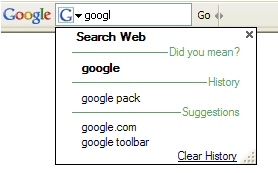
Boutons personnalisés : il est possible d'ajouter des boutons personnalisés, permettant de chercher dans certains sites sélectionnés. Google propose pas défaut des boutons pour chercher dans quelques sites célèbres (New York Times, News.com, CBS SportsLine.com, CNET.com, mySimon, Webshots, MP3.com, GameSpot, etc.) mais une galerie entière a été mise en place ! Bien entendu il est possible de créer un bouton pour son propre site, il faut pour cela utiliser la nouvelle Google Toolbar API. En plus de lancer des recherches dans un site particulier, ces boutons peuvent aussi afficher la liste des éléments d'un flux RSS ou Atom. 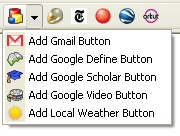
Connexion au compte Google : un bouton permet de se connecter facilement à son compte Google, permettant désormais l'accès à tous les services qui nécessitent une authentification (Gmail, AdWords, AdSense, etc.)
Bookmarks : Un bouton permet de mettre en bookmarks une page, ou d'accéder à sa liste de bookmarks. L'intérêt est que ces bookmarks sont stockés en ligne dans son compte Google, ce qui permet d'y accéder de n'importe quel ordinateur, à condition d'être connecté à son compte Google.
Envoi par email ou SMS : Un bouton permet d'envoyer une page entière ou un extrait par email (Gmail) ou SMS, gratuitement (l'envoi est gratuit mais pas forcément la réception, cela dépend de l'opérateur mobile).
Cette nouvelle version (4.x.x.x
) est pour l'instant disponible uniquement pour Internet Explorer en anglais. Elle existe aussi en version Enterprise : la Google Toolbar Beta for Enterprise propose un utilitaire facilitant son déploiement sur un réseau d'ordinateurs.
Google Toolbar pour Firefox, v1
Début juillet 2005, Google sortait (enfin) une version pour Firefox de sa toolbar, sous forme d'extension pour Firefox. Google annonce aujourd'hui que ce produit n'est plus en version beta. La dernière version (v 1.0.20050922) intègre la fonctionnalité de Google Suggest et facilite la personnalisation de l'affichage de la barre d'outils dans le navigateur (pour prendre moins de place à l'écran) :
Ouvrez le menu « Affichage » de votre navigateur.
Sélectionnez « Barres d'outils », puis « Personnaliser ». La fenêtre Modification des barres d'outils apparaît. Elle contient les différents éléments que vous pouvez ajouter à votre barre d'outils.
Faites glisser les icônes à insérer sur les différentes barres d'outils. Vous pouvez les placer où vous le souhaitez, à côté du menu Fichier ou de la barre d'adresses par exemple. Pour désactiver une fonctionnalité, il vous suffit de faire glisser l'icône correspondante de la barre d'outils vers la fenêtre Modification des barres d'outils. Pour activer une fonctionnalité, faites glisser l'icône figurant dans la fenêtre Modification des barres d'outils vers l'endroit où vous souhaitez l'insérer.
Une fois que vous avez terminé, cliquez sur le bouton « Terminer » de la fenêtre Modification des barres d'outils.
Vous pouvez à tout moment rétablir la présentation d'origine en procédant comme suit :
Ouvrez le menu « Affichage » de votre navigateur.
Sélectionnez « Barres d'outils », puis « Personnaliser ».
Cliquez sur le bouton « Configuration par défaut ».
Cliquez ensuite sur le bouton « Terminer ».
En personnalisant ainsi, et en utilisant désormais cette toolbar, je n'ai plus besoin des extensions Firefox suivantes :
- Gmail notifier
- PageRank status
- Google Toolbar (mozdev)
Google Toolbar pour Firefox, v2
Parmi les nouveautés de cette barre d'outils Google, Google facilite l'abonnement aux flux présents sur les pages visitées, détecte le phishing, s'intègre mieux à Gmail...
Navigation sécurisée Google
Navigation sécurisée Google La fonctionnalité de navigation sécurisée, auparavant une extension autonome, est maintenant intégrée à la barre d'outils Google. La fonctionnalité de navigation sécurisée Google affiche un avertissement dès lors que vous accédez à une page Web douteuse vous invitant à fournir des informations confidentielles (d'ordre personnel ou financier). Cette technique, appelée phishing (usurpation d'identité) ou spoofing (usurpation d'adresse), tend à se perfectionner et à se généraliser. Grâce à l'utilisation d'algorithmes avancés et de rapports relatifs aux pages frauduleuses, provenant de diverses sources, la fonctionnalité de navigation sécurisée est en mesure de vous avertir automatiquement lorsque vous affichez une page suspecte, tentant d'obtenir des informations personnelles vous concernant.
Barres d'outils personnalisées
La version Firefox de la barre d'outils a toujours facilité l'organisation de vos fonctionnalités favorites, selon vos préférences. Nous avons encore développé ces possibilités en proposant trois présentations prédéfinies vous permettant d'organiser boutons, zones de recherche et autres commandes de navigation afin de tirer le meilleur parti de l'espace disponible dans Firefox.
Abonnement à un flux
Vous pouvez désormais vous abonner aux flux de vos pages Web favorites en un simple clic. De nombreux sites Web publient des flux permettant de recevoir leurs dernières mises à jour. Vous pouvez donc, au lieu de revenir sans arrêt sur le même site pour consulter les nouveautés, utiliser un lecteur de flux pour vous tenir informé des mises à jour. La barre d'outils détermine automatiquement s'il est possible de s'abonner à un flux et active le bouton « S'abonner » pour vous en avertir. Une fois le bouton activé, cliquez simplement sur « S'abonner » pour accéder au lecteur de flux que vous avez choisi et confirmer votre abonnement.
Envoyer avec Gmail
Souhaitez-vous définir Gmail comme votre client de messagerie par défaut ? À cet effet, nous avons ajouté à la barre d'outils une fonctionnalité qui permet d'ouvrir automatiquement Gmail lorsque vous cliquez sur un lien d'e-mail.
Commentaires
Si vous êtes webmaster et que vous proposez des flux de syndication sur votre site (format RSS ou Atom, cela ne change rien), il est recommandé de faire connaître ces flux sur vos pages, à l'aide d'une icône comme Symbole d'un flux RSS ou Atom mais surtout à l'aide d'une ligne dans le code HTML.
Google Toolbar pour Firefox, v3
En décembre 2006, Google vient de sortir la version 3 de sa barre d'outils pour Firefox. Elle apporte les fonctionnalités présentes dans la version pour Internet Explorer, qui n'étaient pas encore incluses dans celle pour Firefox. Elle ajoute aussi exclusivement pour les utilisateurs de Firefox un support de Google Docs and Spreadsheets.
Nouvelles fonctionnalités :
gestion des bookmarks (favoris) directement sur la barre d'outils
ajout de boutons personnalisés
fonction Envoyer à, par mail ou SMS
connexion directe à votre compte Google
lien direct avec Google Docs & Spreadsheets
Ces informations viennent de Google ; vous en trouverez d'autres sur la page principale de la Google Toolbar pour Firefox V3.
Boutons personnalisés :
Vous pouvez intégrer des boutons à votre barre d'outils pour accéder directement à vos sites Web favoris et y effectuer des recherches, mais aussi pour recevoir les flux qui vous intéressent. La Galerie des boutons propose une sélection de boutons prédéfinis, correspondant à des sites connus. Vous pouvez également créer vos propres boutons en quelques secondes. Cliquez simplement avec le bouton droit à l'intérieur du champ de recherche de n'importe quel site et sélectionnez "Effectuer une recherche personnalisée...".
Envoyer à :
La barre d'outils Google vous permet de partager des pages Web par e-mail, message texte (SMS) ou par l'intermédiaire de votre blog. Pour partager une page complète, sélectionnez simplement "Envoyer à" dans le menu de la barre d'outils. Pour n'en partager qu'un extrait, sélectionnez tout d'abord la section que vous souhaitez partager, puis cliquez sur "Envoyer à".
Remarque : L'envoi de messages texte par le biais de la barre d'outils Google est gratuit. Votre opérateur de téléphonie mobile peut toutefois vous facturer des frais pour la réception de vos messages (par SMS reçu ou sur une base mensuelle, selon votre forfait).
Favoris :
Vous voulez créer des favoris pour y accéder depuis n'importe quel ordinateur ? Il vous suffit de cliquer sur l'icône en forme d'étoile de la barre d'outils ou de cliquer avec le bouton droit sur cette icône pour ajouter un favori et y associer un libellé. Vous pourrez ainsi accéder à vos favoris depuis tout ordinateur doté de la barre d'outils Google.
Remarque : Cette fonctionnalité permet de stocker vos favoris en ligne. C'est pourquoi vous devez posséder un compte Google et vous connecter chaque fois que vous voulez créer des favoris ou y accéder. Vous pouvez également afficher vos favoris à l'aide de la fonctionnalité d'historique des recherches de votre compte Google. Il vous suffit pour cela de cliquer sur le lien "Historique des recherches" qui apparaît dans l'angle supérieur droit de la page d'accueil Google lorsque vous êtes connecté à votre compte Google.
Connexion à votre compte Google :
Votre compte Google vous permet d'accéder à différents services Google, notamment la page d'accueil personnalisée, Google Groupes et Gmail. Vous pouvez désormais vous connecter et vous déconnecter directement à partir de votre barre d'outils. Il vous suffit de cliquer sur le bouton "Paramètres" situé sur le côté droit de la barre d'outils, puis de sélectionner "Connexion". Lorsqu'une icône représentant un feu vert apparaît sur la barre d'outils, vous êtes connecté.
Champ de recherche amélioré :
À mesure que vous entrez des mots clés dans le nouveau champ de recherche de la barre d'outils, une liste de suggestions utiles apparaît. Ces dernières sont déterminées en fonction des recherches les plus populaires sur Google, des corrections orthographiques, de vos favoris et de l'historique des recherches que vous avez effectuées avec la barre d'outils. Vous pouvez également cliquer sur l'icône "G" à l'intérieur du champ de recherche pour effectuer des recherches dans différents emplacements : les sites Google, le site affiché ou les sites pour lesquels vous avez installé des boutons de recherche personnalisés.
Fin de la barre d'outils Google pour Firefox
En juillet 2011, A partir de la version 5 de Firefox, la barre d'outils Google officielle n'est plus disponible et ne le sera plus jamais...
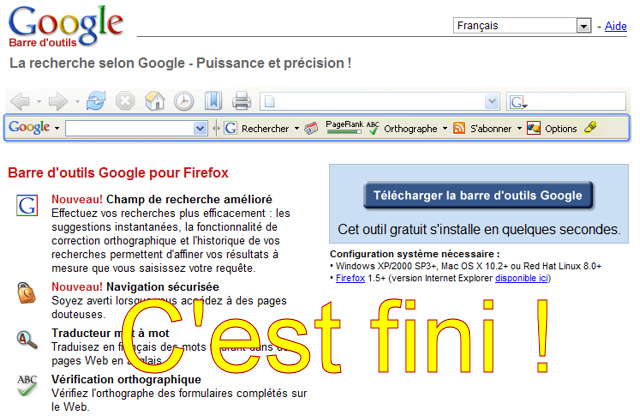 La barre d'outils Google pour Firefox n'existe plus :-(
Google vient de l'annoncer sur son blog en expliquant que la plupart des fonctionnalités apportées par cette toolbar sont désormais intégrées dans le navigateur Firefox. Pour celles qui ne le sont pas d'origine, il faut se tourner vers des extensions Firefox, notamment :
- AutoFill : voir ici
- Traduction de page : voir extensions de traduction
- Partage de page : voir autres
- Vignettes de page pour un nouvel onglet : voir extensions pour créer des thumbnails
- Bookmarks : voir extensions de bookmarks
- Notifications Gmail : voir extensions Gmail
Je vous conseille de consulter ma sélection d'extensions Firefox utiles pour le référencement. Vous pouvez aussi envisager de basculer sur Google Chrome qui dispose également de bonnes extensions.
très facile à utiliser, mais difficile à trouver. Mieux Mozilla que Internet Explorer, avec beaucoup de petits gadgets en plus, traduction, temps, message.
Firefox 5 ne vaut rien sans la toolbar de Google. Il donne des erreurs sans arrêt et dirige vers d'autre pages que personne ne demande. Firefox est une catastrophe bien anglaise...